It’s Sunday night. You’re staring at an open Excel spreadsheet, surrounded by crumpled paper receipts, trying to remember what that random $47 transaction from last Tuesday was. Sound familiar? For years, we’ve been told that tracking every single penny manually is the only way to financial freedom. But let’s be honest: manual tracking is exhausting, time-consuming, and almost impossible to maintain. Life moves too fast for manual math.
We live in a world of instant subscriptions, contactless tapping, and automatic digital payments. Managing your money manually simply doesn’t work anymore. If you are still trying to type every coffee purchase into a spreadsheet, you are fighting a losing battle against your own busy schedule.
Thankfully, personal finance looks completely different today. A modern budgeting app does not just track what you spent yesterday; it acts as a real-time financial co-pilot. In 2026, smart budgeting apps will completely revolutionise how we handle our money, turning a stressful chore into a seamless, automated habit.
Table of Contents
What is a Budgeting App and How Does it work?
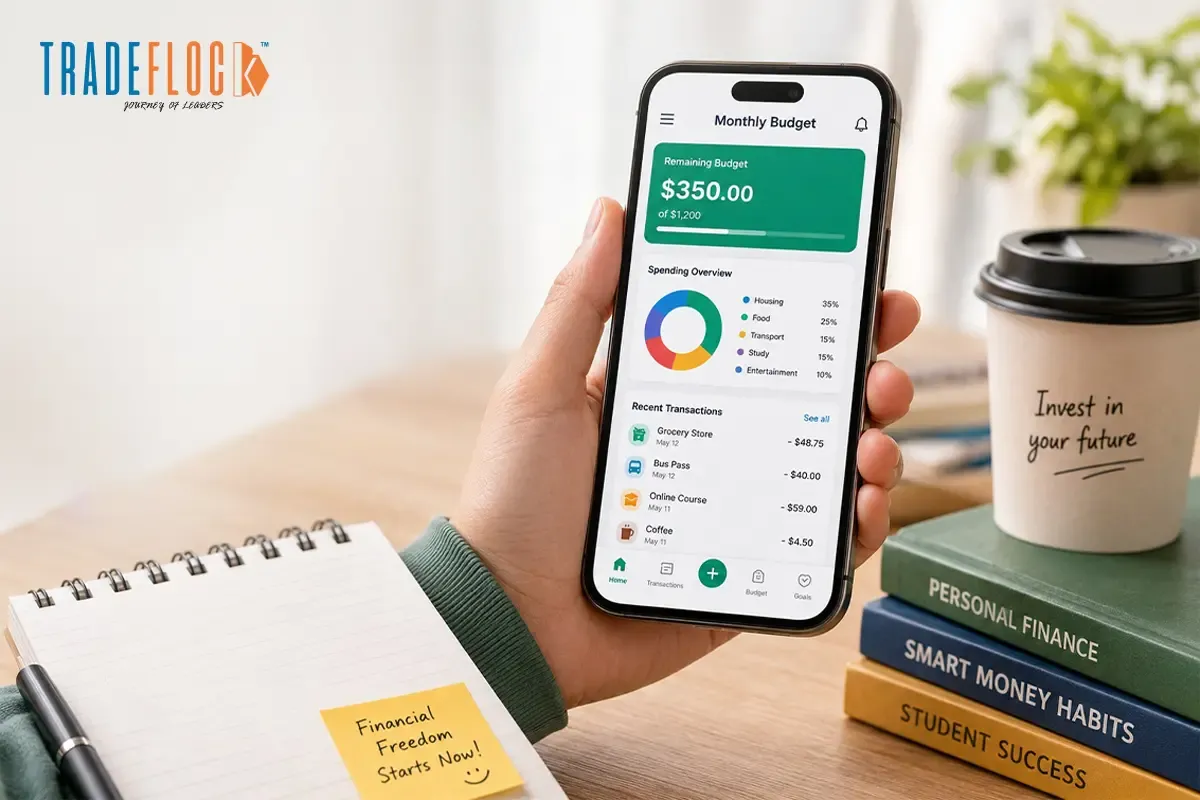
At its core, a budgeting app is a digital tool designed to help you track your income, monitor your savings goals, and control your spending. Instead of forcing you to log into multiple banking portals to check your balances, it brings your entire financial life into a single central dashboard.
Real-Time Bank Synchronisation
Modern apps use secure, encrypted data networks to connect directly to your checking accounts, credit cards, investment portfolios, and loans. Every time you swipe your card or make an online purchase, the budgeting app automatically downloads the transaction, categorises it (e.g., “Groceries” or “Entertainment”), and updates your remaining allowance instantly.
Best Budgeting Apps in 2026
The personal finance market is crowded, but a few standalone options consistently deliver the best results. Here is a quick look at the highest-rated platforms this year:
| Budgeting App | App Store Rating | Best For |
| YNAB (You Need A Budget) | 4.8 / 5.0 | Complete financial control and debt elimination |
| Empower | 4.7 / 5.0 | Net worth tracking and investment monitoring |
| PocketGuard | 4.6 / 5.0 | Preventing overspending with simple “In My Pocket” math |
| Honeydue | 4.5 / 5.0 | Couples who want to manage shared expenses together |
| Goodbudget | 4.4 / 5.0 | Fans of the traditional paper envelope method |
What Makes an App Worth Using?
A truly great budgeting app must balance security with convenience. It should save you time, protect your data with bank-level encryption, and provide clear, actionable insights rather than just displaying confusing charts and graphs.
Free Budget App — Best Options That Cost Nothing
You do not need to spend money just to learn how to save it. If you are on a tight budget, a free budgeting app can easily get you on the right track without adding another monthly bill to your plate.
Top Free Picks for 2026
- Wallet (by BudgetBakers): Offers excellent manual tracking for free, with beautiful charts and multi-currency support.
- Money Manager: A highly popular, clean visual diary for your money that operates perfectly without any subscription fees.
- Empower (Free Version): While it leans heavily toward wealth management, its free dashboard is incredible for tracking your overall spending and net worth.
These apps tell you about money management tips in 2026 and how you can use these apps in the best way possible. According to a report by Vanguard, people who use their finances smartly are set to improve their financial stability.
Free vs. Paid Features
Free apps are fantastic, but they usually require a compromise. Free versions often include ads, limit the number of bank accounts you can link, or require you to manually enter every single transaction. Paid apps remove these restrictions, giving you fully automated bank feeds, ad-free layouts, and advanced premium customer support.
Best Budgeting Apps for Couples — Manage Money Together
Money is one of the leading causes of relationship stress. Managing finances with a partner requires excellent communication, which is exactly why couples need a dedicated budgeting app built specifically for teamwork.
Top Picks for Partners
- Honeydue: The ultimate app for couples. It allows you to link your separate bank accounts while choosing exactly how much info you share with your partner. You can see joint balances while keeping your personal spending private.
- Goodbudget (Shared Plan): Perfect for couples who want to share a digital “envelope system” to split household expenses like groceries and rent.
- YNAB Together: Allows multiple family members to create separate budget profiles under one single paid subscription.
Key Features for Couples
When shopping for a partner-friendly tool, look for shared accounts that update in real time, expense-splitting calculators, and joint goal trackers so you can both watch your holiday fund or wedding savings grow together. Using these tools helps you talk about numbers based on cold, hard data rather than raw emotion, preventing unnecessary arguments.
Free vs Paid Budgeting Apps — Which One Should You Choose?
Are you feeling stuck trying to decide between a free and a paid premium option? Let’s break down which route makes the most sense for your current financial situation.
When a Free App is Enough
A free budgeting app is perfect if you are a student, a freelancer with a highly predictable income, or someone who already has disciplined spending habits. If you don’t mind spending 5 minutes a day manually entering your receipts, a free tool will give you all the data you need
need without costing a dime.
When Upgrading to Paid Makes Sense
Upgrading to a paid app is worth it if you have multiple credit cards, active loans, and investment accounts that are too tedious to track manually. If paying a small monthly fee saves you hours of tedious spreadsheet work and prevents a single $40 overdraft fee (when you spend more money than the amount available in your bank account), the app has easily paid for itself.
How to Actually Stick to a Budget Using These Apps
Downloading an app is a great first step, but it won’t fix your finances by itself. You need to build the right daily and weekly habits to make it work.
- Set Realistic Categories: Do not set a $50 monthly grocery budget if you consistently spend $300. Look at your past spending data and set realistic, honest targets that you can actually achieve.
- Turn On Instant Alerts: Enable push notifications. Receiving a gentle alert that says, “You have $20 left in your dining out category” right before you open a food delivery app is a powerful way to stop impulse spending.
- Build a Weekly Check-In Habit: Pick one morning a week, like Sunday morning, over coffee, to open your budgeting app. Spend just five minutes reviewing your transactions, approving categories, and checking your progress.
Common Budgeting Mistakes These Apps Help You Avoid
Human brains are terrible at tracking money accurately. We naturally tend to ignore our bad spending habits. A digital tool acts as an honest mirror, protecting us from three massive financial traps:
- The Hidden Subscription Trap: It is incredibly easy to forget about old streaming services, gym memberships, and app subscriptions. A smart app instantly flags these recurring payments so you can cancel what you don’t use.
- The “Small Purchase” Blindspot: A $5 coffee here and a $4 snack there don’t feel like much at the time. However, these tiny daily purchases can easily add up to hundreds of dollars by the end of the month. Your app tracks them automatically.
- Ignoring the Future: When we manage money in our heads, we only think about immediate bills. An app keeps your long-term savings goals front and centre, ensuring you pay your future self first.
There is no single “perfect” tool for everyone. The absolute best budgeting app is simply the one that you will actually open and use consistently.
- Choose YNAB if you want an active, life-changing system to crush your debt.
- Choose Honeydue if you want to manage money with your partner without the stress.
- Choose Wallet or Money Manager if you want a clean, simple tool that costs absolutely nothing.
Stop wasting your weekends fighting with manual spreadsheets or stressing over mysterious bank balances. Start small, stay consistent, and let a smart app do the heavy lifting for you!
Frequently Asked Questions:
Are budgeting apps safe and secure?
Yes, most reputable budgeting apps are safe. They use bank-level encryption to protect your data, but they never store your actual banking passwords or allow money transfers.
Can I connect my Indian bank, UPI, and credit cards?
Yes, many modern budgeting apps allow you to securely connect your Indian bank accounts, credit cards, and UPI transactions to track your spending automatically in one central place.
Do I have to manually enter my transactions?
Most modern budgeting apps sync automatically with your bank account, so you usually do not have to enter transactions manually. Some apps still allow manual entry for privacy.
What are the best budgeting apps for college-going students?
Great apps for students include Goodbudget for envelope-style planning, YNAB for goal-setting, PocketGuard for tracking daily spending, and Splitwise to easily share expenses with roommates.